

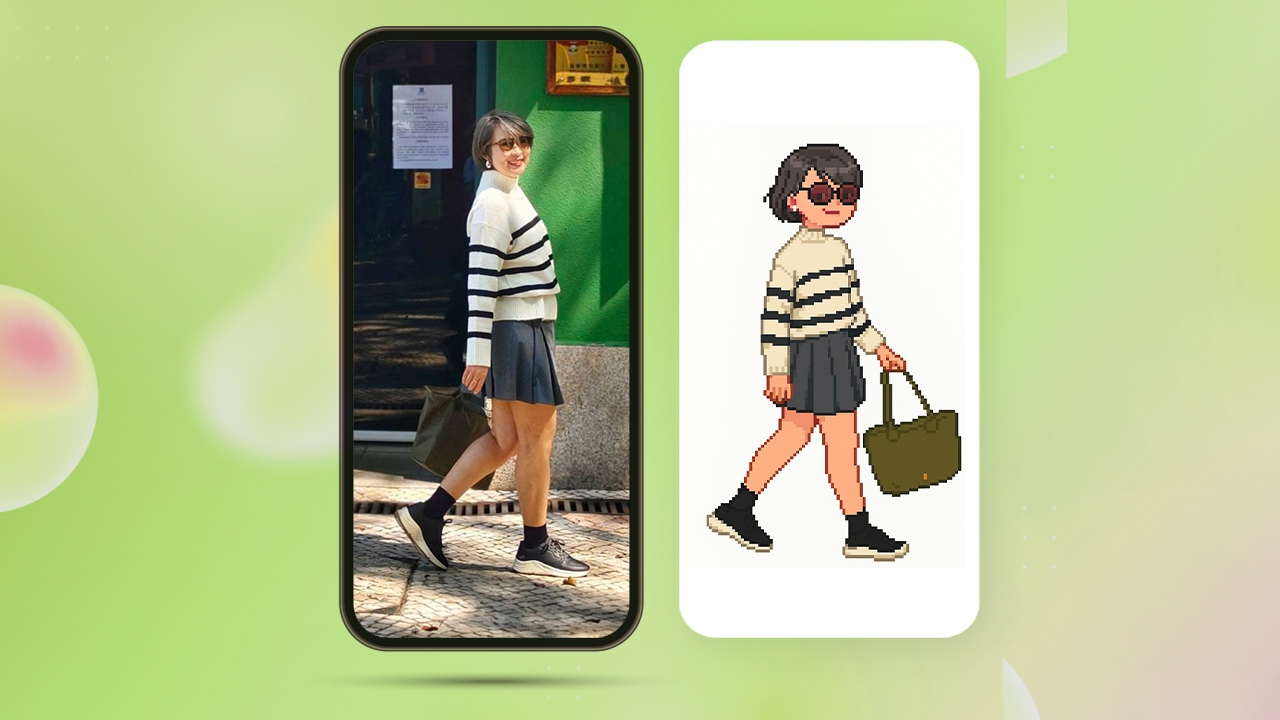
Beyond transforming yourself into an Art Toy, ChatGPT can now also conjure you as a retro-style 8-bit Pixel cartoon. The process is very easy, and we have compiled the steps for you.
1. Download the ChatGPT app.
2. Select the photo you want to convert into an 8-bit Pixel cartoon.
3. Enter the prompt command, which can be in either Thai or Chinese, as follows.
4. Once you get the desired image, you can download and save it on your phone or computer. Alternatively, you can have fun comparing and styling it alongside the original photo.
This trend of turning oneself into an 8-bit Pixel cartoon originated among Chinese teenagers, and naturally, Thai Gen Z youth have also embraced it. From our trials, using the Chinese prompt on mobile ChatGPT produces faster results than Thai. However, on computer-based ChatGPT, the speed is comparable for both languages, so it depends on which platform you prefer.
An 8-bit Pixel cartoon is a form of digital art derived from "Pixel Art," which according tothe Creative Thailand website,is a type of digital art made by arranging tiny square dots, known as pixels, into images. This style emerged in the early days of computer graphics when displays for computers and early video games were limited to pixel-based rendering.
The term "Pixel Art" became popular and widely recognized from the late 1970s to early 1980s, when video game designers had to use these pixel dots to create characters, backgrounds, and objects within games. Due to the limited performance and memory of computers then, these artists embraced pixel art as a way to express digital art. Legendary games like Pac-Man and Space Invaders remain iconic examples of early pixel art.
Another term closely linked to pixels is "bit." Many people have heard of 8-bit, 16-bit, or 32-bit games. Both pixels and bits are key components in creating digital media. A pixel is a single dot in an image or video, while a bit represents the color or intensity of that dot. Combining many pixels creates higher-resolution images or videos, and the bit count correlates with the number of pixels.
This relates to the number of colors or the color intensity levels used, known as 'bit-depth.' The higher the bit-depth, the more detailed the image appears because it allows for more color shades, enabling smoother blending between pixels and resulting in more realistic images compared to those with low bit-depth.
In short, pixels form the shapes in an image, while bits determine how many color shades the image can use.