

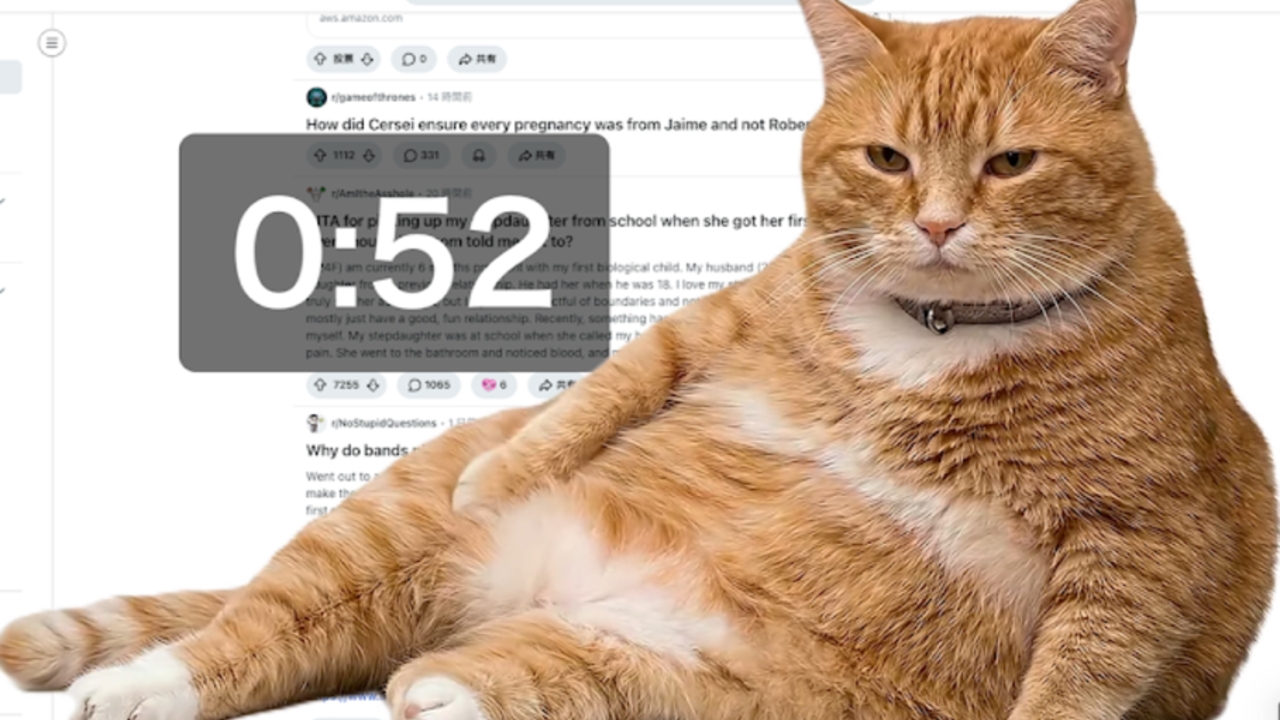
Say goodbye to social media addiction with Cat Gatekeeper, an innovative browser extension that sendsa chubby orange catto sit on your screen when you’ve been online too long! This helper turns taking breaks into a cute and truly effective experience.
In an era when we often absentmindedly scroll through social media and lose track of time, known as“Doomscrolling,”personal willpower sometimes isn’t enough. Recently, Japanese developer ZOKUZOKU unveiled a creative solution that uses“cuteness”as a weapon to manage time: Cat Gatekeeper, a Chrome browser extension that sends a chubby orange cat to block your screen once you exceed your social media usage limit.
Cat Gatekeeper is a browser extension designed to help users addicted to social media by mimicking the real behavior of cats who like to sit on keyboards or block computer screens when their owners want to work. In this digital version, the cat appears to“force”you to stop using social media and take a break.
Once you install this extension, it starts a countdown timer whenever you use popular social media platforms such as Facebook, X (Twitter), Instagram, TikTok, YouTube, Reddit, and Threads, featuring:
According to The Cooldown report, cats were chosen because they have a strong influence on human attention online. Using something people mostly like (or some fear) as a"gatekeeper"is a psychological tactic that helps people pause and reflect on their behavior more effectively than simple warning messages.
If you’re ready to let the kitty manage your time, follow these easy steps:
1. Installation: Go to the Chrome Web Store and search for“Cat Gatekeeper”then click the“Add to Chrome”button.

2. Initial settings: Click the extension icon (cat image) on your browser toolbar.
3. Start using: Use social media as usual (Facebook, YouTube, etc.). You’ll see a small clock number on your screen corner showing your remaining time.
If you feel 5 minutes is too short or the cat is too gentle, challenge yourself by“increasing break time”to 10-15 minutes to force yourself to look away from the screen and actually experience the outside world, as recommended by the developer.
Ready to let the kitty guard your screen? Install now and see how long you can tolerate its playful interference!