

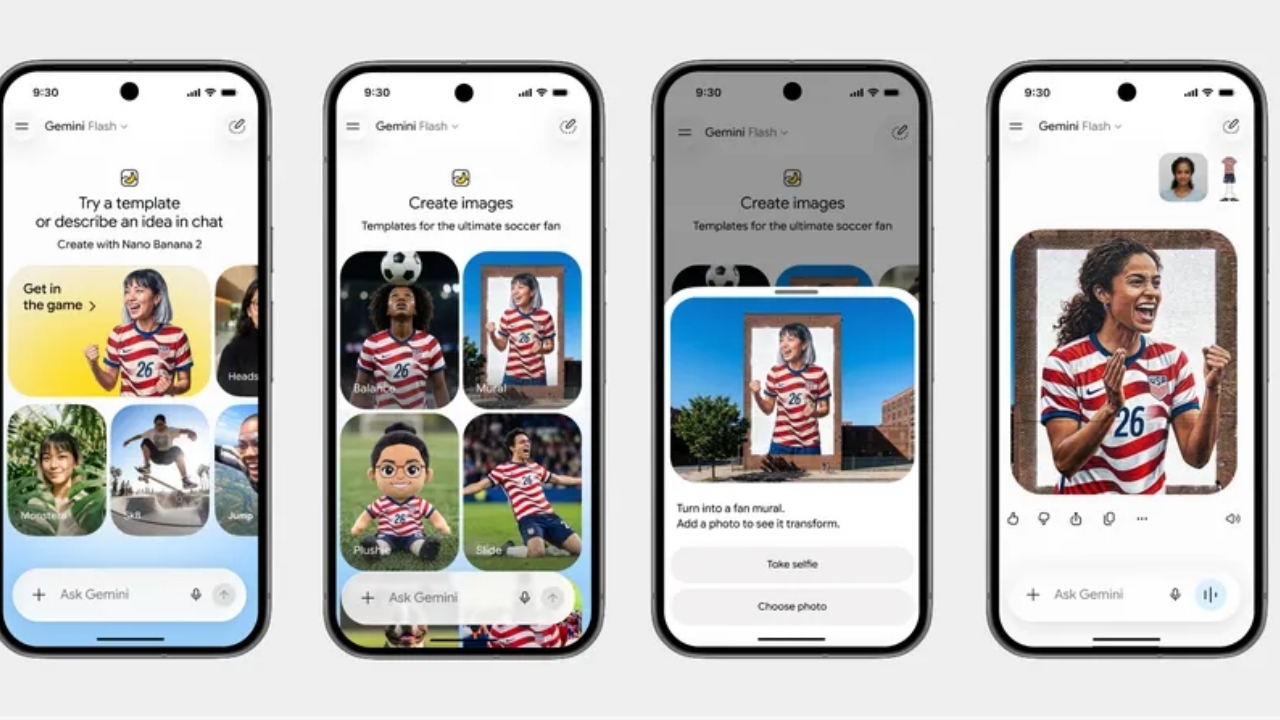
The 2026 World Cup has started, and Google has joined the excitement by releasing a feature that allows users to transform their photos into players wearing the national team colors participating in this World Cup.
Nano Banana is a feature on Google Gemini that transforms images into various desired styles. For the 2026 World Cup event, Google has introduced new templates welcoming the tournament, allowing you to upload your photo and convert it into a player from your favorite national team—whether celebrating a goal on the field or taking a stunning shot—dressed in the national flag colors or the team's kit you support in the World Cup.

1. Open the Gemini app on your phone and find templates in two ways: either the new Images tab added to the navigation menu or from Gemini's home screen by tapping the + sign and selecting "Create image" in the command bar.

2. Choose your preferred football template from the designed set, such as a goal celebration scene on the field or a shooting goal scene.

3. Upload your photo into the selected scene. The system will place your face onto that scene with the team kit or national colors.
4. Wait for Gemini to process and generate the image, then save or share it immediately.