

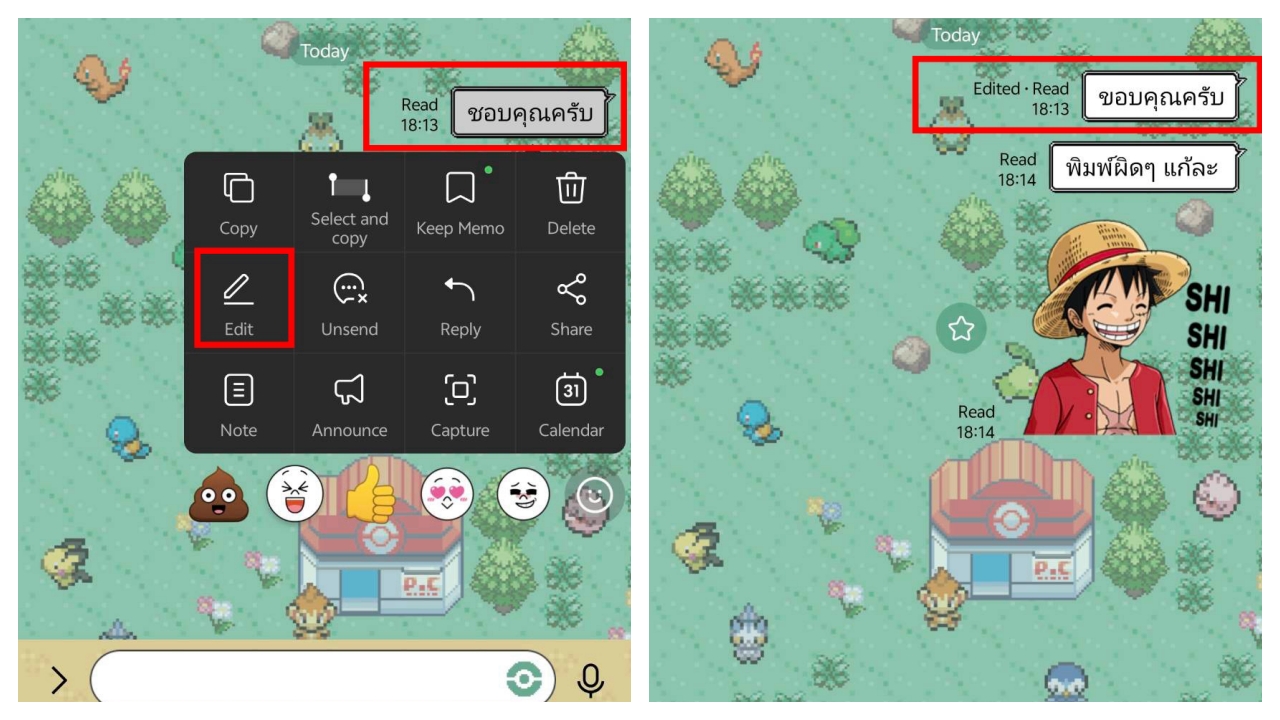
Finally, LINE supports message editing, allowing users to enable it for free through LINE Labs, but only for messages sent within the last 15 minutes.
LINE allows general users to try out the message edit feature for free via the LINE Labs menu, applying to messages inone-on-one chatsandgroup chats, which can be edited within 15 minutes from the time sent. Messages in Keep Memo can be edited within 6 days. Previously, users had to delete and resend entire messages if they made a typo.To enable it, update the LINE app on your smartphone to the latest version 26.13.0 or above, then go to the Home tab, select Settings, and then LINE Labs, found under the Language menu.
Next, toggle the Message edit switch to green. The system will display a data usage agreement from LY Corporation for you to accept before starting. For those using LINE on a computer, update to version 26.4.1 on Windows or macOS.
Once enabled, press and hold the message you want to edit, select the edit option, and type the new content. The message bubble will show 'Edited' or "แก้ไขแล้ว" to indicate it has been modified.
chatThis label informs readers that the message has been edited.After the trial period, the message editing feature is expected to become a premium benefit exclusive to LINE Premium members, LINE's monthly subscription service.

Editing messages has been a highly requested feature by LINE users. Other apps like Telegram allow message edits without a premium subscription and for messages sent well beyond 15 minutes ago.