Co-Payment Plus Phase 2 updates the method for identity verification via the "Pao Tang" app on smartphones, with registration opening this December to receive a 2,000 baht subsidy throughout the program.
Mr. Siripong Angkasunkit, spokesperson for the Office of the Prime Minister, revealed that the Ministry of Finance plans to submit a proposal to the Cabinet next week seeking approval for the "Co-Payment Plus Phase 2" program to stimulate continuous spending next year. Registration will open at the end of December 2025, with spending starting in January 2026.
The program limits 10 million eligible participants, each receiving 2,000 baht.
The Co-Payment Plus Phase 2 program is expected to be divided into two parts as follows:
- Five million rights will go to people who have never participated before and those living in flood-affected areas and provinces involved in border conflicts with Cambodia.
- Five million rights will be allocated for people who have previously participated in the Co-Payment Plus program.
It is expected that the 10 million eligible participants in Co-Payment Phase 2 will each receive 2,000 baht in total assistance throughout the program.
Participants can spend at participating stores between 06:00 and 23:00 via the G-Wallet in the "Pao Tang" app, without the requirement to use the full daily limit of 200 baht.
Steps for registering for Co-Payment Plus.
1. Download the "Pao Tang" app and activate the G Wallet service.
2. Registration is open from 20 Oct to 26 Oct 2025, between 06:00 and 22:00.
3. Those who participated in Co-Payment Phase 5 (2022) can check registration results via the "Pao Tang" app.
4. Those who have never participated in Co-Payment Phase 5 (2022) can check registration results via SMS and the "Pao Tang" app.
5. Eligible recipients can enter the "Pao Tang" app and tap the Co-Payment Plus banner to start spending from 29 Oct to 31 Dec 2025, between 06:00 and 23:00.
Eligibility criteria for registration.
- Must be a Thai national.
- Must be at least 16 years old on the registration date.
- Must have a national ID card.
- Must not hold a government welfare card according to the Ministry of Finance database as of 1 October 2025.
- Must not be suspended from rights or required to repay funds from previous state programs including Co-Payment phases 1 to 5.
How to register with the "Pao Tang" app for first-time users:
- Download and install the "Pao Tang" app.
- Open the "Pao Tang" app.
- Turn off Wi-Fi during the registration process.
- Agree and confirm acceptance of terms and conditions (KYC Consent) for personal data management.
- Consent to allow the "Pao Tang" app to verify your phone number.
- Start by entering your national ID number and mobile phone number.
- Wait to receive and enter the OTP sent to your registered mobile phone number.
- Enter your personal information or choose to fill it via the ThaiD app.
- Prepare to scan your face, moving it within the circle as guided.
- Set and confirm your PIN code.
- Accept the terms and conditions for using the "Pao Tang" app.
- Enter your PIN again to access the "Pao Tang" app.
- Consent to personal data management under the PDPA.
- Access the main screen of the "Pao Tang" app.
- Registration with "Pao Tang" is complete.
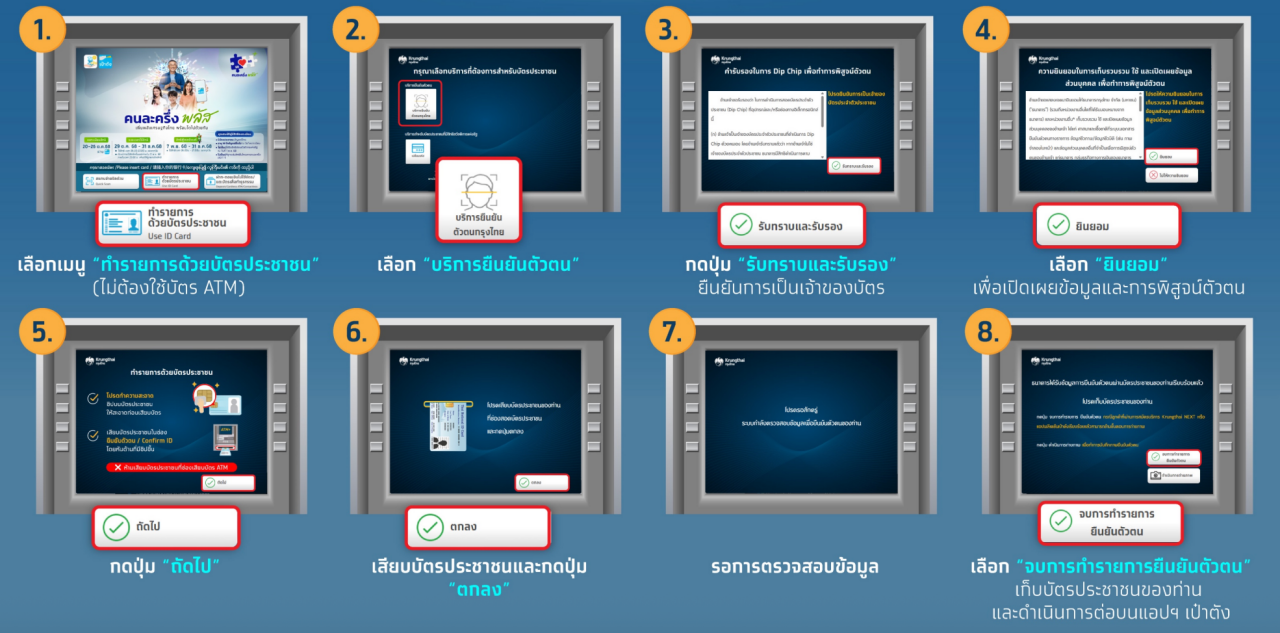
Co-Payment Plus identity verification via Krung Thai Bank ATM (gray ATM) with screen buttons below.
- Select the menu “Transactions with ID card” (no ATM card required).
- Choose “Identity Verification Service.”
- Press “Acknowledge and Confirm” to verify card ownership.
- Select “Consent” to disclose information and verify identity.
- Press the “Next” button.
- Insert your national ID card and press “OK.”
- Wait for information verification.
- Choose “Finish Identity Verification,” remove your ID card, and continue on the "Pao Tang" app.
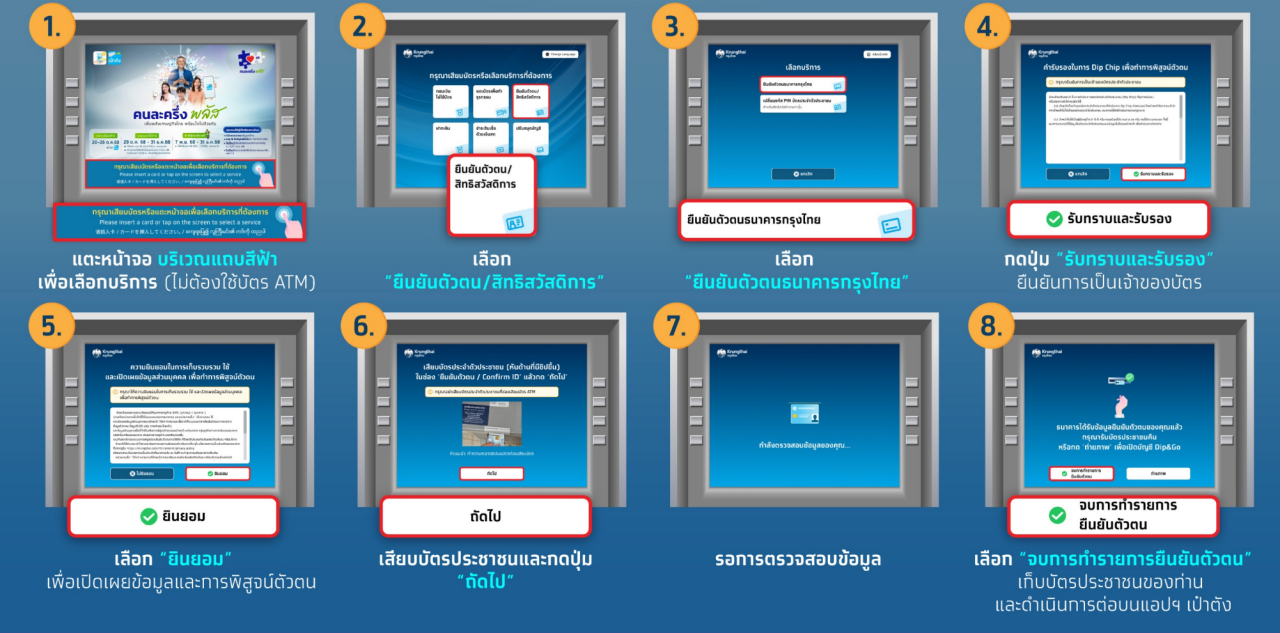
Co-Payment Plus identity verification via Krung Thai Bank ATM (gray ATM) without screen buttons below.
1. Tap the blue bar on the screen to select service (no ATM card required).
2. Select “Identity Verification / State Welfare Card.”
3. Choose Krung Thai Bank identity verification.
4. Press “Acknowledge and Confirm” to verify card ownership.
5. Select “Consent” to disclose information and verify identity.
6. Insert your national ID card and press “OK.”
7. Wait for information verification.
8. Choose “Finish Identity Verification,” remove your ID card, and continue on the "Pao Tang" app.