


Update on conditions "Khon La Khrueng Plus Phase 2" When it will start and steps for identity verification and registration via the "Pao Tang" app Click to claim benefits and await receipt of 2,000 - 2,400 baht
After the 2026 election, with the Bhumjaithai Party led by Anutin Charnvirakul set to form the new government, the policy "Khon La Khrueng Plus" and "Khon La Khrueng Plus Phase 2" are being discussed again as they are flagship short-term economic stimulus policies and had been delayed due to the parliament dissolution. Anutin Charnvirakul confirmed that Khon La Khrueng Plus Phase 2 will definitely proceed.
Previously, Deputy Prime Minister and Finance Minister Akniti Nitithanprapas revealed progress on the Khon La Khrueng Plus project, stating that the system must be prepared and once the government is officially formed, the project can proceed immediately.
The plan still follows the original principle: 2,000 baht for those outside the tax system and 2,400 baht for those within it. Consideration is ongoing whether to distribute simultaneously or first to those who missed out in the first round, including the Thailand Individual Savings Account (TISA) to encourage savings.
For the previous "Khon La Khrueng Plus" registration round, eligibility criteria included:
1. Thai nationality, aged at least 16 years old on the registration date
2. Possession of a national ID card
3. Not holding a state welfare card as per Ministry of Finance records
4. Not suspended or required to refund money in state projects including (1) Khon La Khrueng phases 1 to 5.

The latest plan for Khon La Khrueng Plus Phase 2 is expected to be divided into two groups:
This can be spent at participating stores between 06:00 and 23:00 via the G-Wallet in the "Pao Tang" app, with no requirement to use the full 200 baht daily quota.
For those who have never used it before, follow these steps:
1. Download and install the Pao Tang app.
2. Open the Pao Tang app.
3. During registration, turn off Wi-Fi.
4. Agree and confirm acceptance of the terms (KYC Consent) for personal data management.
5. Consent for the app to verify phone number.
6. Start by entering your national ID number and mobile phone number.
7. Wait for and enter the OTP sent to the registered mobile number.
8. Fill in personal information or tap the tab to identify personal data via the ThaiD app.
9. Prepare to scan your face, moving it within the circle as instructed.
10. Set and confirm a PIN code.
11. Accept the terms and conditions of using the Pao Tang app.
12. Enter the PIN again to access the Pao Tang app.
13. Consent to personal data management under PDPA.
14. Access the main page of Pao Tang.
15. Pao Tang registration is complete.
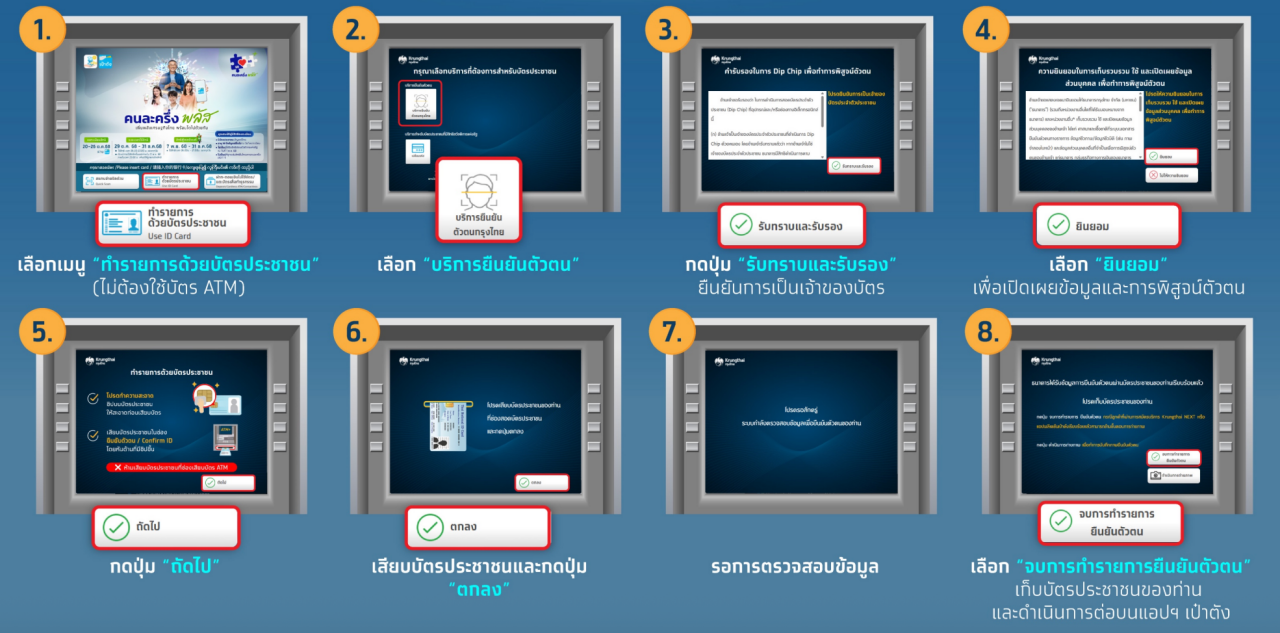
Verify identity at Krungthai Bank ATM (gray ATM) with buttons below the screen.
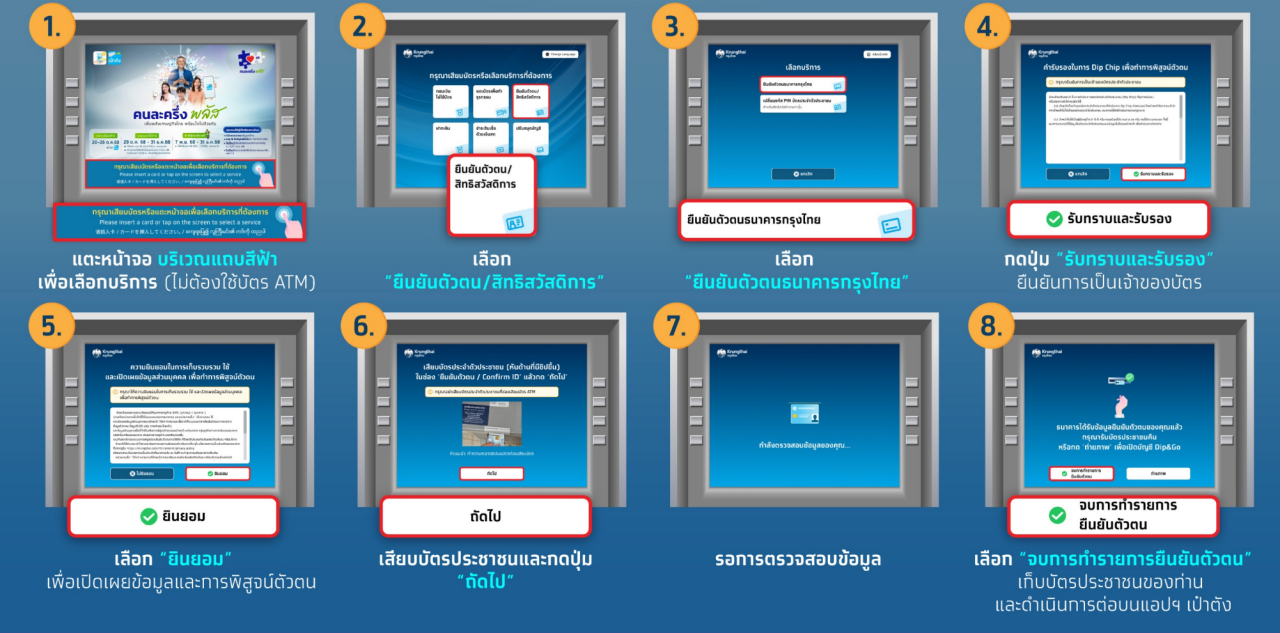
Verify identity at Krungthai Bank ATM (gray ATM) with no buttons below the screen.
1. Tap the blue bar on the screen to select services (no ATM card needed).
2. Choose "Identity Verification / State Welfare Card."
3. Select Krungthai Bank identity verification.
4. Press "Acknowledge and Confirm" to verify card ownership.
5. Select "Consent" to disclose information and prove identity.
6. Insert ID card and press "OK."
7. Wait for data verification.
8. Choose "End Identity Verification" option, take your ID card, and continue on the Pao Tang app.
However, further clarity from the government is awaited. Updates will be reported accordingly.
Referenceswww.khonlakhruengplus.com