Prepare to register "Khon La Khrueng Plus Phase 2" Revealing how to verify identity via the Paotang app and steps to update the app to the latest version, with chances to receive benefits of 2,400 and 2,000 baht to spend during May 2026.
Update on the progress of the project "Khon La Khrueng Plus Phase 2" Following the scheduled state ceremony to open the parliamentary session today (14 Mar 2026)ThenOn 15 Mar 2026, the parliament will convene to elect the Speaker and Deputy Speakers. According to the government formation timeline, "Anutin Charnvirakul" after the 8 Feb election can be anticipated as follows:
In summary, after the new government delivers its policy statement to Parliament, "Anutin Cabinet 2" will begin duties, likely implementing campaign-promoted policies, which may include "Khon La Khrueng Plus Phase 2" Originally expected to start after June, but might commence sooner.
Meanwhile, Deputy Prime Minister and Finance Minister Ekniti Nitithanprapas earlier stated that preparations are underway to have the system ready once the government is official to implement the program immediately. The original principle remains: 2,000 baht for those outside the tax system, 2,400 baht for those within, with considerations on whether to distribute simultaneously or prioritize those missed in the first round, plus the Thailand Individual Savings Account (TISA) to encourage savings.
Regarding the latest registration conditions for "Khon La Khrueng Plus" from the previous round, eligibility criteria are as follows:
1. Must be a Thai national.
2. Must be at least 16 years old on the registration date.
3. Must have a national ID card.
4. Must not hold a state welfare card as per the Ministry of Finance database as of 1 Oct 2025.
5. Must not have suspended rights or been required to return funds from state projects including: (1) Khon La Khrueng Phase 1 (2) Phase 2 (3) Phase 3 (4) Phase 4 and (5) Phase 5.
The government pays 50% (up to 200 baht per person per day).
The total benefit amount for spending during the project period from 29 Oct 2025 to 31 Dec 2025 is as follows:
Registration for "Khon La Khrueng Plus" is only available through the Paotang app, where users must tap the banner for the Khon La Khrueng Plus program according to the specified conditions and time frame (until quotas or budget run out). The steps are as follows:
1. Download the Paotang app and activate G Wallet.
2. Tap to register for the benefit via the Khon La Khrueng Plus banner between 06:00 and 22:00.
3. Await registration results for "Khon La Khrueng Plus."
However, during registration, many encountered issues and missed out on receiving Khon La Khrueng benefits in previous rounds due to lack of the Paotang app or problems downloading it because their phones were incompatible or failed identity verification within the app. Queues at banks were too long, causing many to lose out. Detailed recommendations are as follows: 1. Open
App Storeor Google Play or Play Store, compatible with Android 9.0 or higher and iPhone iOS 15.0 or higher.For iOS users - (
3. Select "GET" or "Install."
4. After installation, open the Paotang app.
5. Consent to manage identity verification data.

6. Prepare your national ID card.
7. Photograph the front of your ID card for verification.
8. Verify your ID number and enter your phone number to receive an OTP.
9. Enter the 6-digit OTP received on your mobile phone.
10. Fill in ID card information.
11. Choose your method of identity verification.
How to update the Paotang app to the latest 2026 version
1. Open App Store or Google Play Store.2. Search "Paotang" and tap the "Update" button.Steps to verify identity and activate the Paotang app
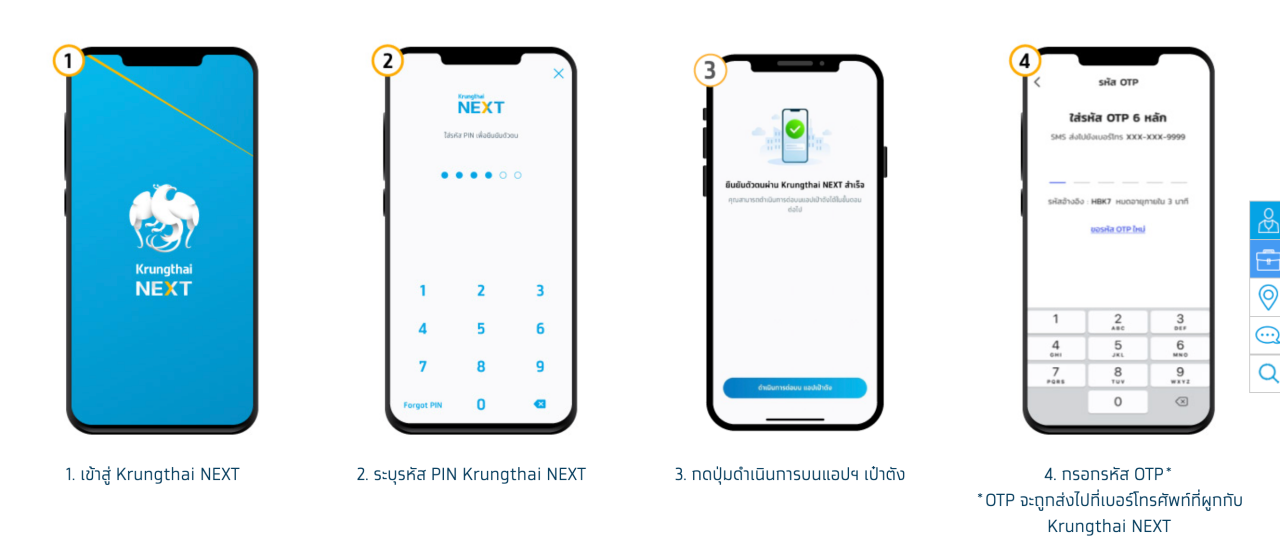
If verifying identity via Krungthai NEXT account:
1. Log into Krungthai NEXT.
3. Tap the proceed button on the Paotang app.
4. Enter the OTP sent to the phone number linked to Krungthai NEXT.
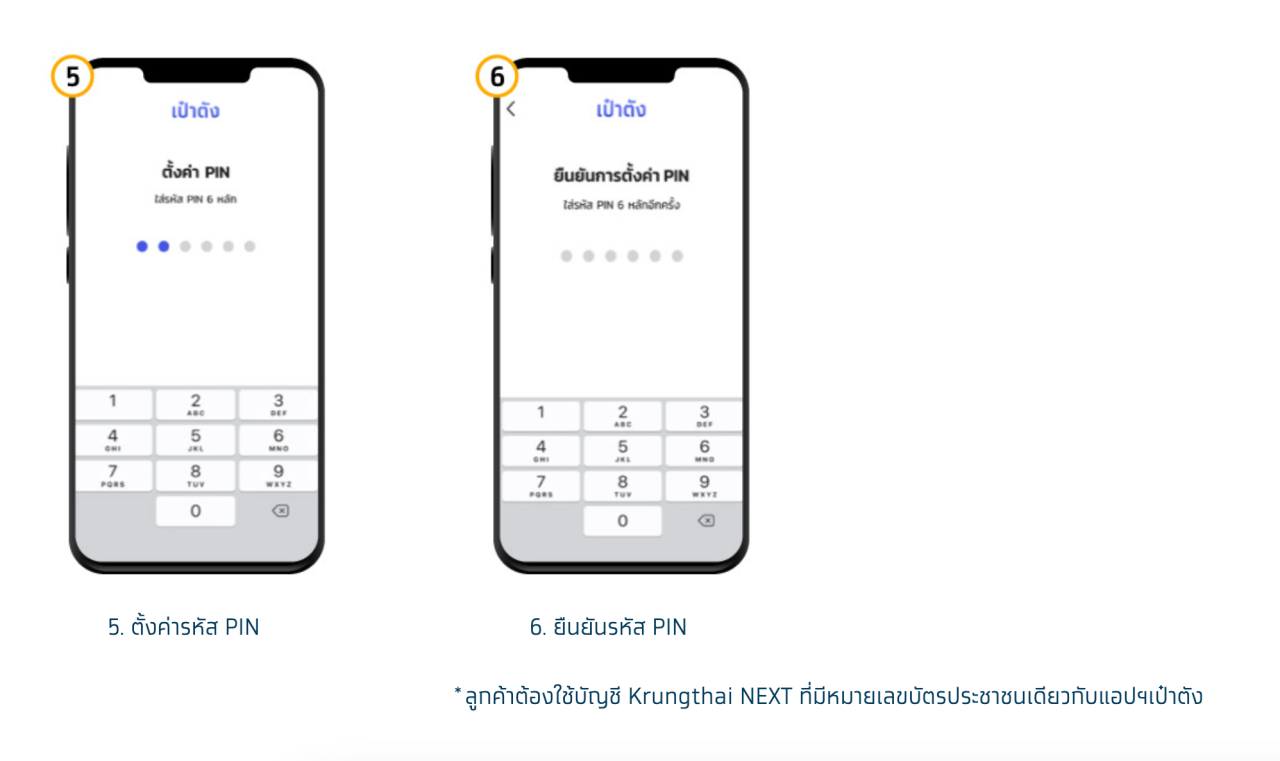
5. Set a new PIN.
6. Confirm the PIN.
Applicants must use a Krungthai NEXT account with the same ID number as registered in the Paotang app.
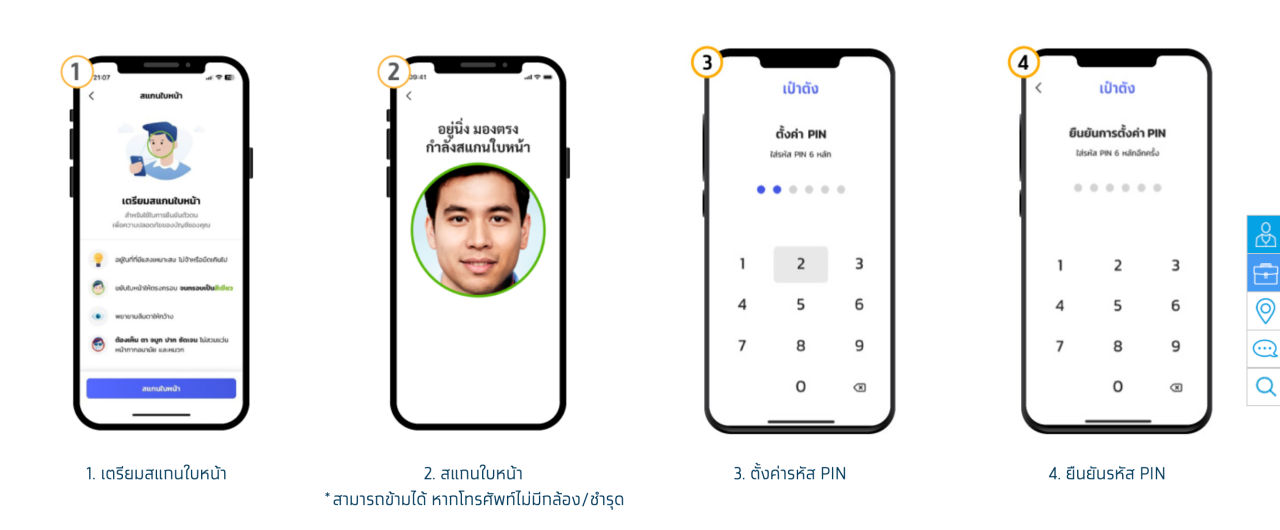
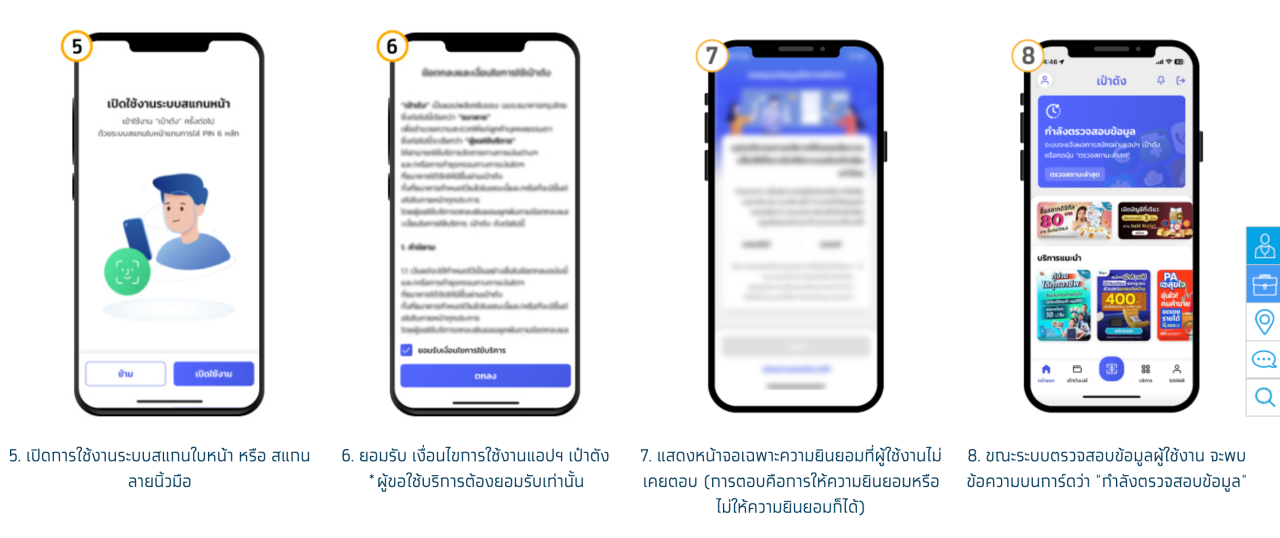
If verifying identity by facial scan:
1. Prepare for face scan.
2. Perform the face scan (optional if the phone lacks a camera or it’s broken).
3. Set a PIN.
4. Confirm the PIN.
5. Enable face or fingerprint scan system.
6. Accept the Paotang app's terms of use (mandatory for service users).
7. Display consent screens that the user has not yet responded to (users can consent or deny).
8. During data verification, a message "Verifying information" appears on the card.
9. Upon successful registration, a wallet card will appear to allow service subscription.
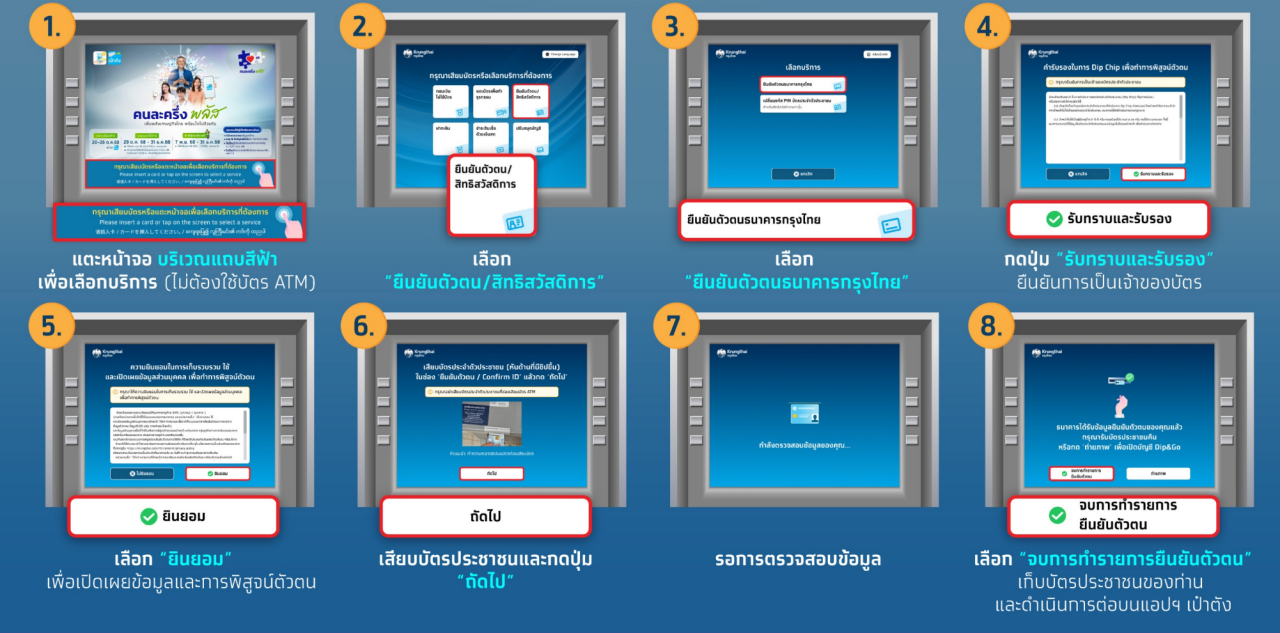
"Khon La Khrueng Plus Phase 2" identity verification via Krungthai Bank ATM machines
Verify identity at Krungthai Bank ATM (gray machines) with bottom button screen:
Select "Transaction with ID card" (no ATM card needed).
Press "Acknowledge and certify" to confirm card ownership.
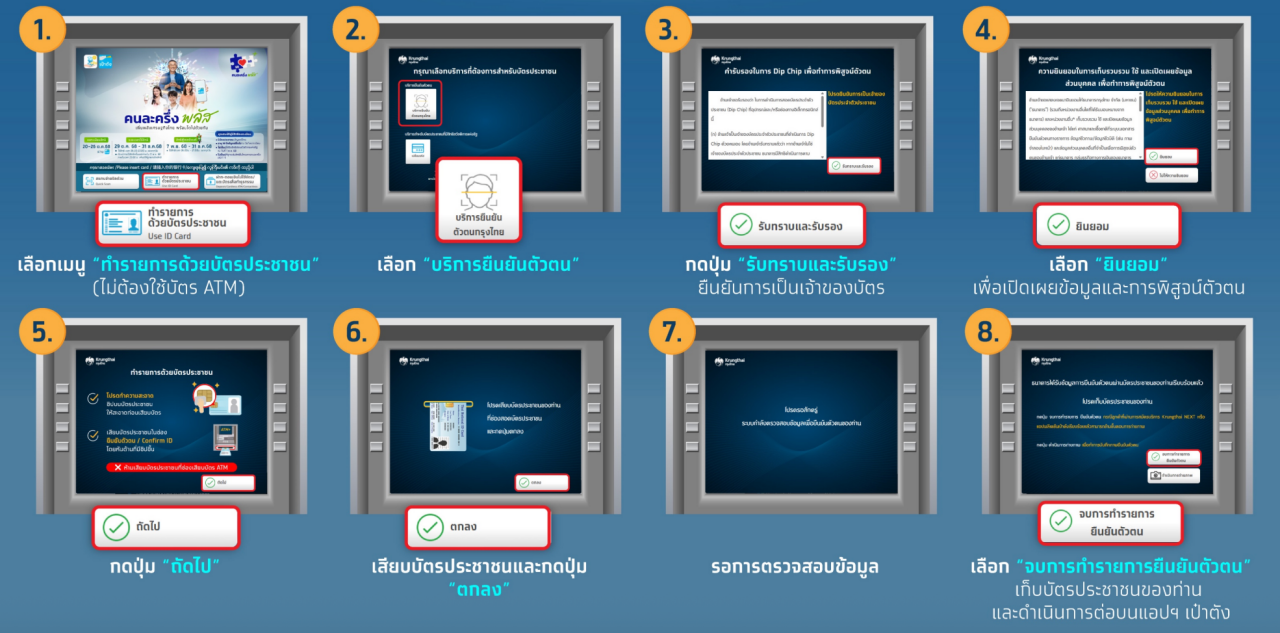
3. Select Krungthai Bank identity verification.
4. Press "Acknowledge and certify" to confirm card ownership.
5. Select "Consent" to disclose information and verify identity.
6. Insert ID card and press "OK."
7. Wait for data verification.
8. Choose "Finish identity verification transaction," take your ID card, and continue on the Paotang app.
Following Deputy Prime Minister Anutin's policy announcement, any updates will be reported accordingly.