An update on the 'Khon La Khrueng Plus Phase 2' project reveals the latest timeline, with hopes of using the benefits by May 2026, along with instructions on updating the 'Pao Tang' app to its latest version.
Project progress 'Khon La Khrueng Plus Phase 2' Following the state opening of parliament yesterday, on 15 Mar 2026, the 27th House of Representatives, first year, held an extraordinary session focusing on electing the Speaker and two Deputy Speakers of the House.
According to the government formation timeline, after the 8 Feb general election, 'Anutin Charnvirakul' is expected to proceed as follows.
It can be inferred that after the new government presents policies, the 'second Anutin cabinet' will start work, implementing previously promoted policies during the election campaign, possibly including 'Khon La Khrueng Plus Phase 2'. Originally expected after June, the launch may occur earlier.
Meanwhile, 'Deputy Prime Minister and Finance Minister Ekniti Nitithanprapas' has previously stated that preparations are underway for the 'Khon La Khrueng Plus' project system, which can proceed immediately after the official government is formed, maintaining the original principle of 2,000 baht for non-tax system participants and 2,400 baht for those in the tax system. They are also considering whether to distribute funds simultaneously or prioritize those missed in the first round, along with the Thailand Individual Savings Account (TISA) to encourage savings. /
Regarding registration conditions, 'Khon La Khrueng' In the previous phase, eligibility conditions for receiving funds were set as follows.
1. Must be a Thai national.
2. Must be at least 16 years old on the registration date.
3. Must have a national ID card.
4. Must not hold a state welfare card according to the Ministry of Finance database as of 1 Oct 2025.
5. Must not have had rights suspended or been required to refund money in any previous state projects, including phases 1 to 5 of 'Khon La Khrueng'.
These are individuals who filed personal income tax returns using form Por Ngor Dor 90 (general income), form Por Ngor Dor 91 (income under Section 40(1) of the Revenue Code), or form Por Ngor Dor 95 (tax reduction) for the 2024 tax year, according to the Revenue Department database as of 30 June 2025.
These are individuals who did not file personal income tax returns as described above.
For 'Khon La Khrueng Plus' registration, registration is only through the 'Pao Tang' app, by selecting the 'Khon La Khrueng Plus' project banner within the specified conditions and times (until all rights or budget are allocated). The steps are as follows:
1. Download the 'Pao Tang' app and activate the G Wallet service.
2. Register for the benefit via the 'Khon La Khrueng Plus' banner between 06:00 and 22:00.
3. Await the registration result for 'Khon La Khrueng Plus'.
However, during past 'Khon La Khrueng Plus' registration rounds, many encountered problems missing out on benefits due to lacking the 'Pao Tang' app or being unable to download it because their mobile phones were incompatible or failed identity verification. Attempting to verify identity at bank queues was often too late, causing many to lose eligibility. Detailed recommendations are as follows. 1. Open the App Store or Google Play Store on phones running Android 9.0 or later, or iPhone with iOS 15.0 or later.
For iOS users - (
3. Select 'GET' or 'Install'.
4. After installation, open the 'Pao Tang' app.
5. Consent to data management for identity verification.

6. Prepare your national ID card.
7. Take a photo of the front of the ID card to verify identity.
8. Verify the ID number and enter your phone number to receive an OTP code.
9. Enter the 6-digit OTP received on your phone.
10. Fill in the ID card information.
11. Choose the method for identity verification.
How to update the 'Pao Tang' app to the latest 2026 version.
1. Open the App Store or Google Play Store.
2. Search for 'Pao Tang' and tap the 'Update' button.
Steps for identity verification and activating the 'Pao Tang' app.
1. Log into Krungthai NEXT.
2. Enter your Krungthai NEXT PIN.
3. Tap the proceed button in the 'Pao Tang' app.
4. Enter the OTP sent to the phone number linked to Krungthai NEXT.
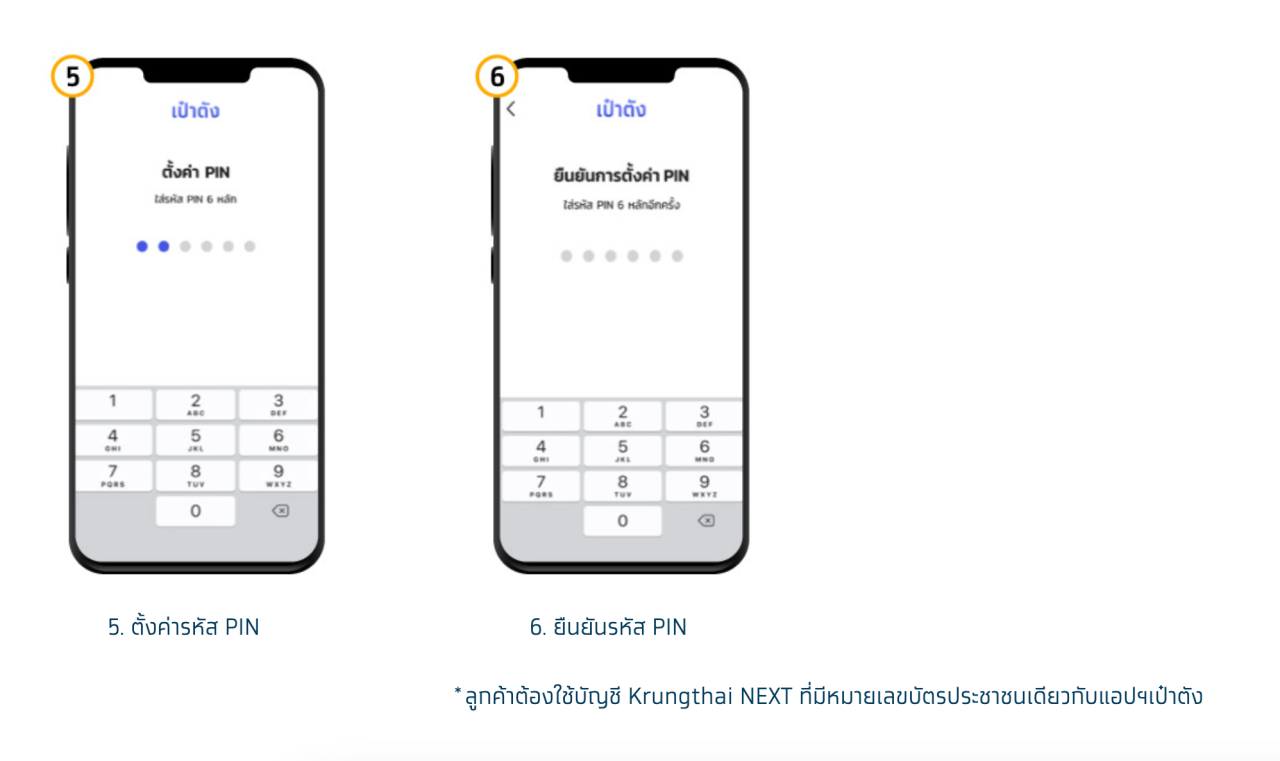
5. Set a new PIN code.
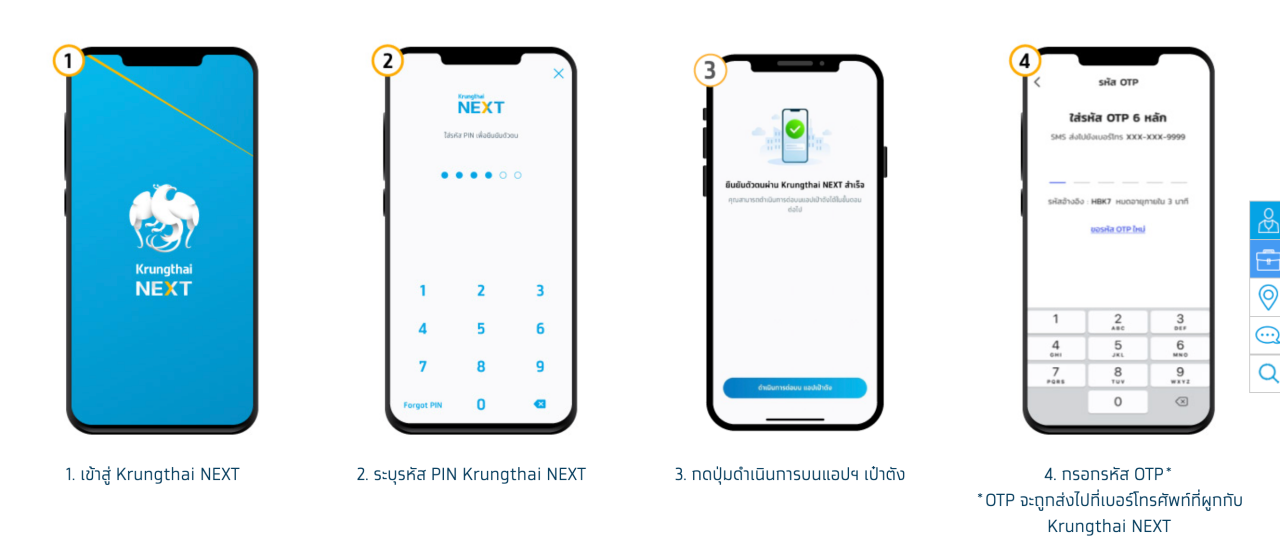
6. Confirm the PIN code.
Applicants must use a Krungthai NEXT account with the same national ID number as registered in the 'Pao Tang' app.
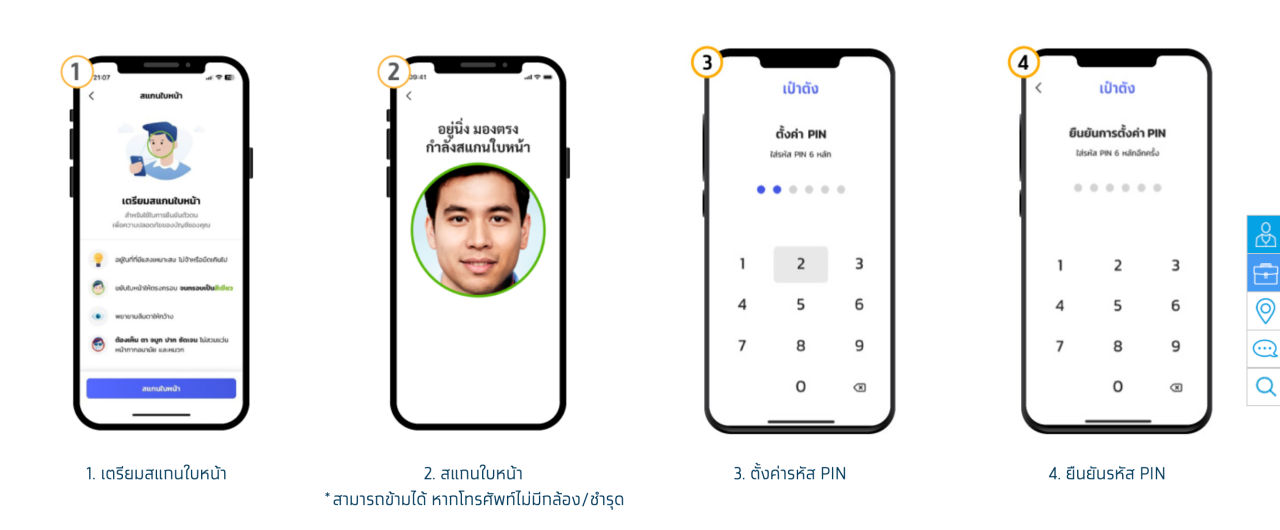
For verification via facial scan:
1. Prepare to scan your face.
2. Scan your face (this step can be skipped if the phone lacks a camera or it is damaged).
3. Set a PIN code.
4. Confirm the PIN code.
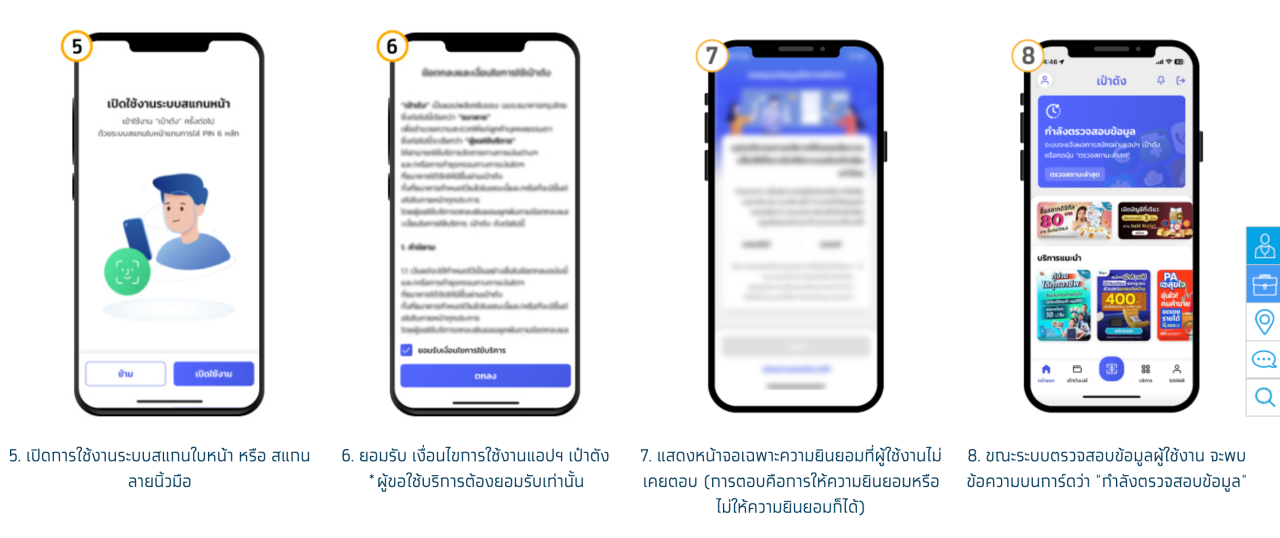
5. Enable face or fingerprint scan system.
6. Accept the 'Pao Tang' app terms of use (users must accept to proceed).
7. The app will display consent screens that the user has not previously answered, allowing them to grant or deny consent.
8. While the system verifies user data, a message 'Verifying data' will appear on the card.
9. Upon successful registration, the wallet card will display as shown, allowing service use.
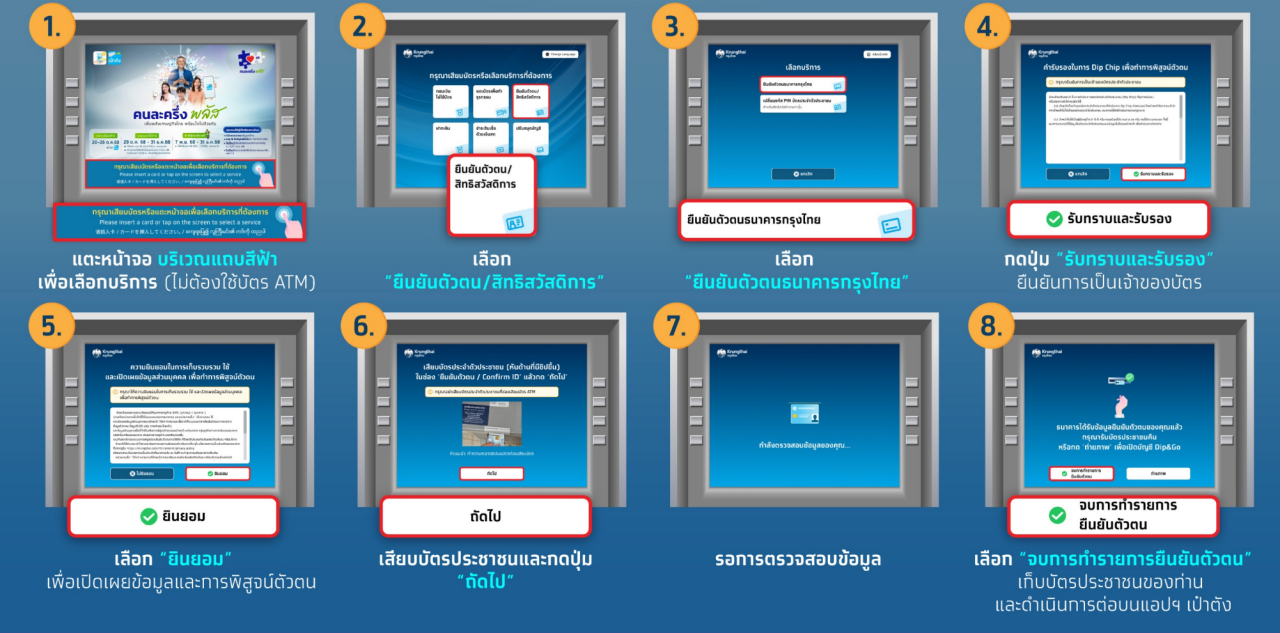
'Khon La Khrueng Plus Phase 2' identity verification via Krungthai Bank ATM.
Select the menu 'Transaction with ID card' (no ATM card needed).
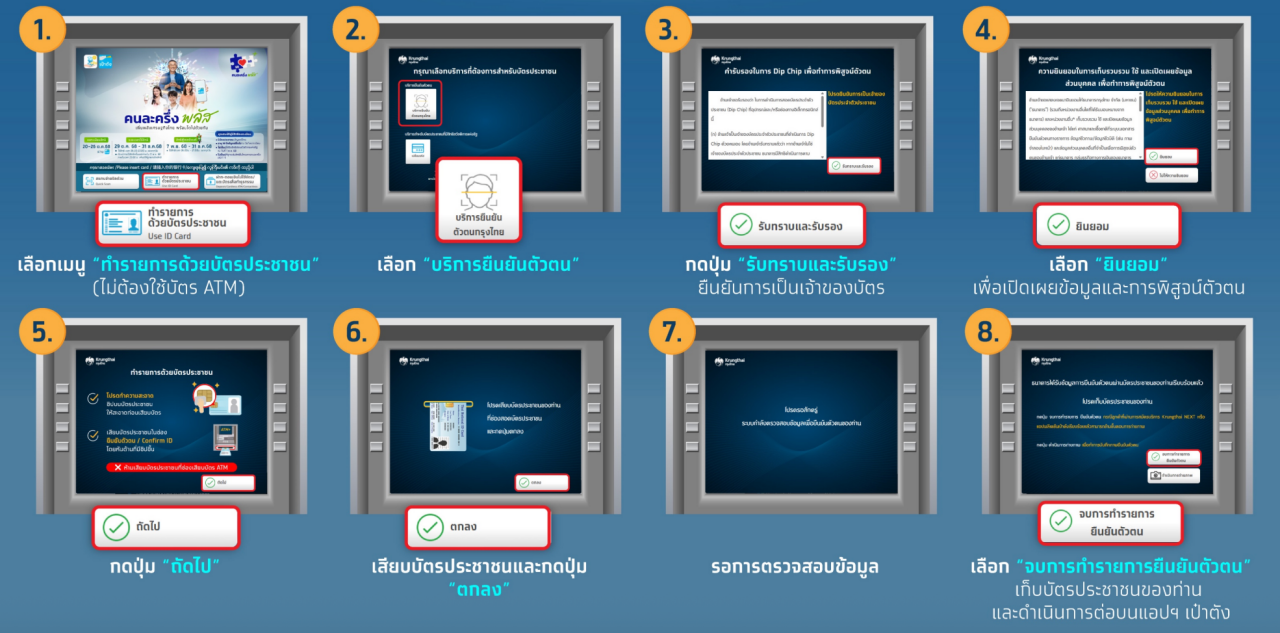
1. Tap the blue stripe on the screen to select service (no ATM card needed).
2. Select 'Identity Verification / State Welfare Card.'
3. Choose Krungthai Bank identity verification.
4. Press 'Acknowledge and Certify' to confirm card ownership.
5. Select 'Consent' to disclose information and verify identity.
6. Insert your ID card and press 'OK.'
7. Wait for data verification.
8. Select 'Complete Identity Verification,' remove the ID card, and continue on the 'Pao Tang' app.
After Anutin's government policy announcement, further updates will be reported as they become available.