

Latest update "Thai Chuay Thai Plus" Preparing to open registration via the "Pao Tang" app, similar to "Khon La Khrueng Plus," by May 2026. Check eligibility criteria, participant qualifications, and how to use the benefits.
The latest update on the Khon La Khrueng Plus program, or "Thai Chuay Thai Plus," on 24 Apr 2026: Deputy Prime Minister and Finance Minister, Mr. Akniti Nititanprapas, stated that registration is planned to start in May, with usage beginning in June. This aligns with the Prime Minister’s policy to provide relief, potentially with a 60:40 split—government 60%, citizens 40%—targeting the general middle class, while vulnerable groups may be exempt from contribution.
Mr. Akniti added that the program will provide cost-of-living relief through the Pao Tang app as before, with everything remaining the same. When asked if the amount would be 1,000 baht per month, he said that was the preliminary plan.
Meanwhile, Prime Minister and Interior Minister Mr. Anutin Charnvirakul, who was present, said it is no longer the "Khon La Khrueng" program and that payments will be distributed gradually over four months.
Previously, Mr. Pradorn Prissanantakul, Minister to the Prime Minister’s Office, revealed that the Khon La Khrueng Plus or Thai Chuay Thai Plus program will change the payment ratio from 50:50 (government 50%, citizens 50%) to 60:40 (government 60%, citizens 40%). Whether payments will be made in a lump sum or in four installments is still under consideration. Eligibility criteria remain the same.
Regarding the previous Khon La Khrueng Plus round, eligibility criteria were as follows:
1. Must be a Thai national.
2. Must be at least 16 years old on the registration date.
3. Must have a national ID card.
4. Must not hold a state welfare card according to the Ministry of Finance database as of 1 October 2025.
5. Must not have been suspended or required to return funds from state projects, including (1) Khon La Khrueng Phase 1, (2) Phase 2, (3) Phase 3, (4) Phase 4, and (5) Phase 5.
For those who have "never" received benefits from Khon La Khrueng Phase 5 (2022):
1. Update the Pao Tang app to the latest version and activate G Wallet.
2. Open the Pao Tang app and tap the "Khon La Khrueng Plus" banner.
3. Accept terms and conditions and confirm registration.
4. Receive registration results via app notifications and SMS within 3 days.
5. Add funds to G Wallet before starting to use the benefits.
6. Use the benefits during government-designated times, from 06:00 to 23:00 daily.
7. Check benefit usage history and remaining balance in the Pao Tang app.
For those who have "previously" received benefits from Khon La Khrueng Phase 5 (2022):
1. Update the Pao Tang app to the latest version and activate G Wallet.
2. Open the Pao Tang app and tap the "Khon La Khrueng Plus" banner.
3. Accept terms and conditions and confirm registration.
4. Receive registration confirmation via app notifications.
5. Add funds to G Wallet before starting to use the benefits.
6. Use the benefits during the government-designated period from 06:00 to 23:00 daily.
7. Check benefit usage history and remaining balance in the Pao Tang app.
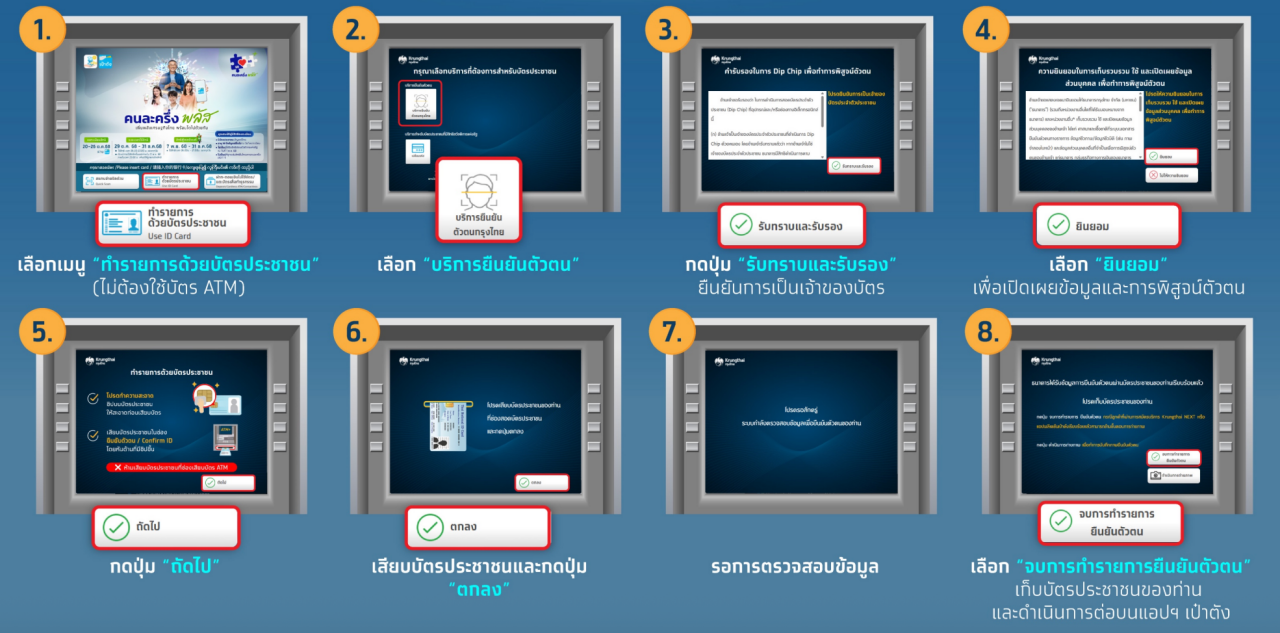
Verify identity through Krungthai Bank ATM (grey machine) with a screen featuring buttons below.
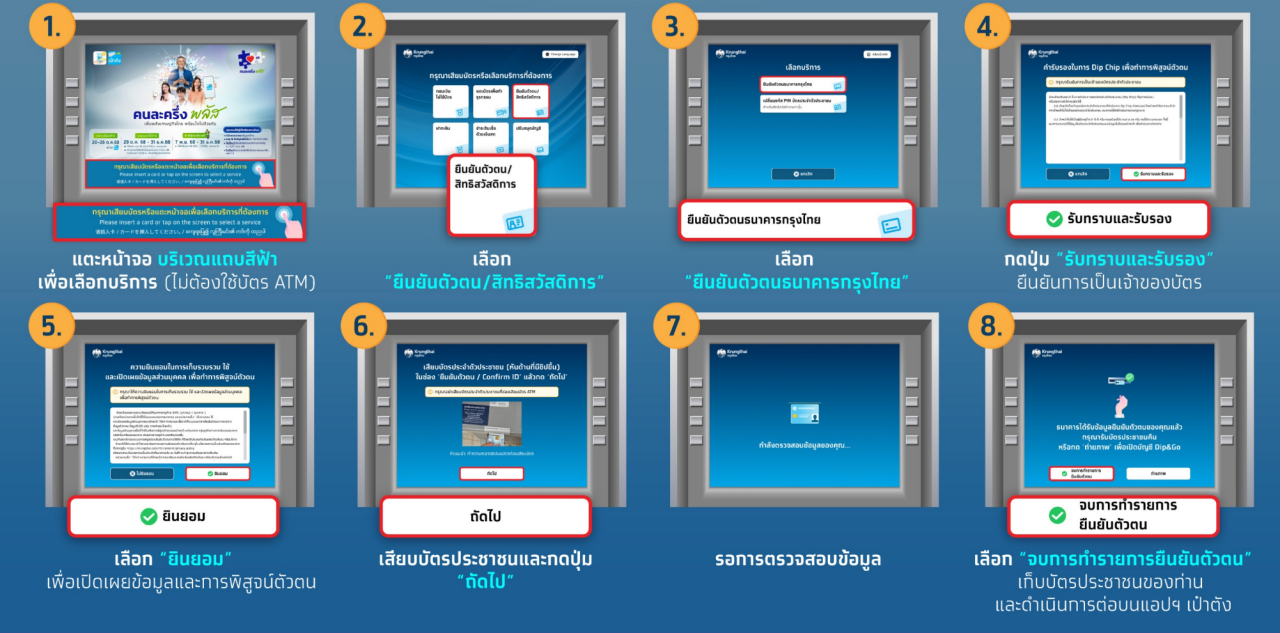
Verify identity via Krungthai Bank ATM (grey machine) with a screen without buttons below.
1. Tap the blue bar area to select service (no ATM card needed).
2. Choose "Identity Verification / State Welfare Card."
3. Select Krungthai Bank identity verification.
4. Press "Acknowledge and Confirm" to verify card ownership.
5. Choose "Consent" to disclose data and verify identity.
6. Insert ID card and press "OK."
7. Wait for data verification.
8. Select "End Identity Verification" to retrieve ID card and continue on the Pao Tang app.
Reference: WebsiteKhonLaKhruengPlus.com