

How to appeal the State Welfare Card. Reviewing the qualification assessment results. "State Welfare Card 2026." All 4 channels covered; the appeal process is easy to follow.
On 17 July 2026, reporters reported that after the Ministry of Finance announced the qualification verification results under the project, "State Welfare Registration Project 2026," for both existing registered beneficiaries and those missed in the initial registration by the Ministry of Interior on 17 July 2026 via the project website, Paotang application, Thang Rat application, and registration units at five banks.
It was found that 9.51 million people qualified out of 18.82 million registrants in the 2026 project qualification verification.
Those who do not meet the 2026 project qualifications can request a review from 17 to 31 July 2026 through the four main channels mentioned above. After submitting a review request, applicants must contact the qualification verification agency to correct their information by 16 August 2026.
Then the qualifications will be re-examined. The review results will be announced on 21 September 2026 via the same four main channels, and beneficiaries can start using their rights from 1 October 2026 onwards.
1. Access the website to check your status.
2. Click the menu to track registration results.
3. Choose a method to verify your data.
4. View your qualification assessment results.
5. Confirm your identity.
6. Fill in information to confirm your request for review.
7. Confirm the review request.
8. The system saves your request successfully.
9. Print the confirmation of your review request for your records.

1. Open the Thang Rat app and search for "State Welfare" then select the menu "Check State Welfare Registration Status."
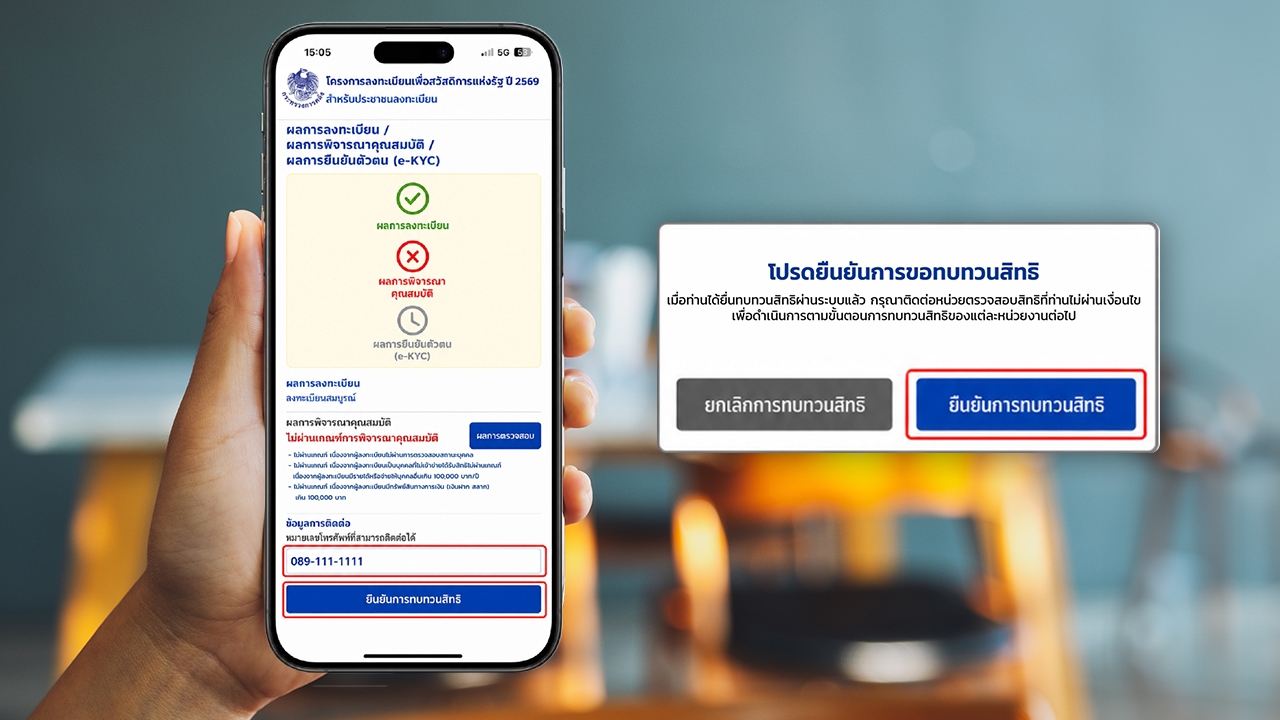
2. Check your registration status. The system will display your status. If it shows "Did not meet qualification criteria," click "Verification Results."
3. Review the detailed assessment results, enter a reachable phone number, then click "Confirm Review Request." Check your information carefully and confirm again in the request confirmation window.

1. Open the Paotang app and tap "Check Results" on the project banner.
2. Tap "Review Rights."
3. Enter your contact information and confirm the review request.
4. Confirm the review request.
5. Review request submitted successfully.

1. Staff log into the system with authorized user credentials and select "Track Registration Status."
2. Read information using the ID card; staff insert the ID card and read data from it.
3. Check registration status. If it shows "Did not meet qualification criteria," proceed with "Review Rights" in the next step.
4. View verification results.
5. See reasons for disqualification with detailed criteria not met.
6. Confirm the review request.

Review requests can be submitted from 17 to 31 July 2026, between 06:00 and 23:00, and documents can be corrected from 17 July to 16 August 2026 at qualification verification offices during working hours.
After submitting a review request, the system will compile the registrants' data for re-verification by the qualification verification agency within the project's specified timeframe. Applicants must personally correct any data inaccuracies with the verification agency if they initially failed the criteria.
Reference website: https://บัตรสวัสดิการแห่งรัฐ.mof.go.th