

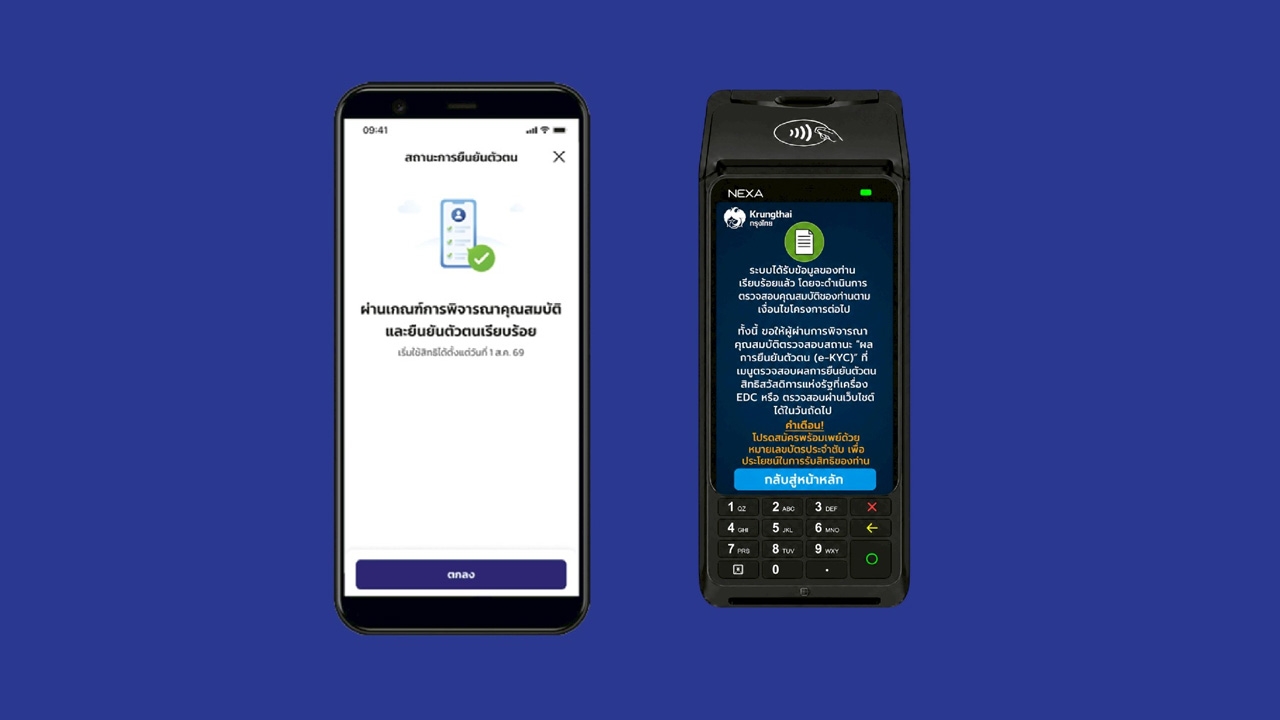
How to complete identity verification (e-KYC) for the "2026 State Welfare Card" via the Paotang app and five registration units, with a reminder that all newly qualified individuals must verify their identity.
The 2026 State Welfare Registration Project As of today (17 July 2026), registrants—both existing cardholders and those previously missed—can check eligibility results, with 9.51 million qualifying out of 18.82 million applicants.
The nationwide eligibility announcement for the 2026 project starts today from 6:00 a.m. onwards through four main channels:
Existing State Welfare Card holders do not need to re-verify identity (e-KYC) and can start using the 2026 project benefits from 1 August 2026.
However, new beneficiaries or those authorizing others must complete identity verification (e-KYC) starting 17 July 2026 to access benefits via two channels and can begin using benefits from 1 October 2026 onward.
Option 1: Through the "Paotang" application
1. Tap "Check Results" on the project banner
2. Tap "Confirm" to start using benefits on the Paotang app
3. Confirm benefit use on the Paotang app
4. Provide consent for the project
5. Verify identity at a service point
6. Perform facial scan
7. Identity verification completed

Steps to activate benefits via the Paotang app for existing qualified cardholders are available from 17 July 2026, daily between 6:00 a.m. and 11:00 p.m.
1. Tap "Check Results" on the project banner
2. Tap "Confirm Benefit Use" via the Paotang app
3. Tap "Confirm" to link the card
4. Tap "Confirm" to confirm benefit usage on the Paotang app
5. Perform facial scan
6. Identity verification completed

Option 2: Through five bank registration units
1. Present your ID card to the bank officer
2. The verifier reads the certification and taps "Acknowledge and Certify"
3. The verifier reads the consent and taps "Consent"
4. Insert the ID card
5. The verifier sets a 6-digit PIN
6. Confirm the 6-digit PIN again
7. Perform facial scan
8. The officer scans the ID card
9. The system shows successful identity verification

For cases authorizing others to use benefits through the five bank units, prepare these documents:
1. Power of attorney (downloadable from the project website)
2. ID card and certified copy signed by the grantor
3. ID card and certified copy signed by the authorized person
4. Disability card (if any) or medical certificate (if any)
Both existing and new qualifiers who authorize others to use benefits must re-verify identity for every case. 1. Present your ID card to the bank officer
2. The verifier reads the certification and taps
"Acknowledge and Certify" 3. The verifier reads the consent and taps
"Consent" 4. Insert the beneficiary's ID card (grantor)
5. The verifier sets a 6-digit PIN
6. Confirm the 6-digit PIN again
7. Scan the beneficiary's ID card (grantor)
8. Select
"Reason for Authorization" and tap OK 9. Attach a photo of the power of attorney document and tap OK
10. Perform facial scan of the authorized person
11. Scan the authorized person's ID card
12. The system confirms successful identity verification.
Reference website https://บัตรสวัสดิการแห่งรัฐ.mof.go.th
